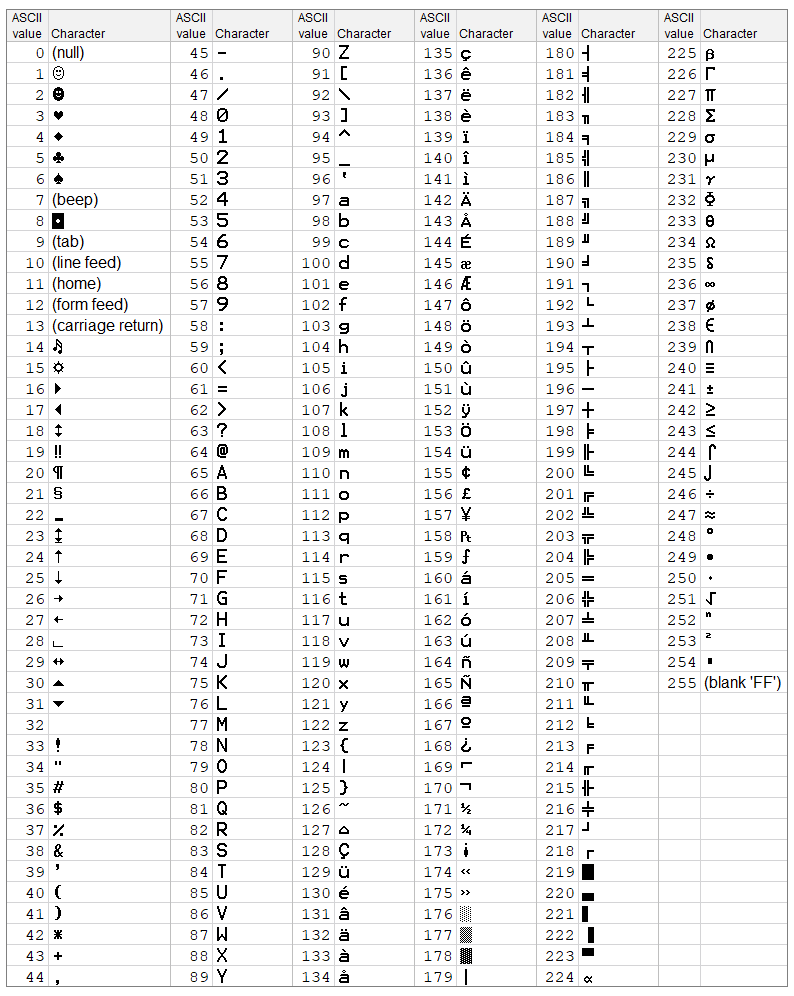
Overview of extended ASCII table
The extended ASCII table contains 256 characters, from 0 to 255. Of course, each character serves a purpose. ASCII is short for American Standard Code for Information Interchange. Each character is an eight-bit code. Thus, each character takes up a byte of storage.
In Excel, use the Terminal font to show these characters. You may not be able to select it from the fonts pull-down. Therefore, just type it in.
If you want to show a character in Windows, then make sure the Num lock key is on. After that, hold down the Alt key and press a three-digit character from the numeric keypad. So, for capital A, you would do Alt + 065. And for lowercase z, press Alt + 122.
Once we get the Mac part in our brains, we will return with updated information.
Key Excel functions
Excel has two key functions that work with character codes – CHAR and CODE.
If you want to display the character code for A, then enter =CODE(“A”). As a result, Excel returns 65.
On the opposite side, use CHAR to show the character. So, =CHAR(122) will display lowercase z.
Note: Depending on your font, you may not see the same character as in the extended table presented here.
Example of using extended codes
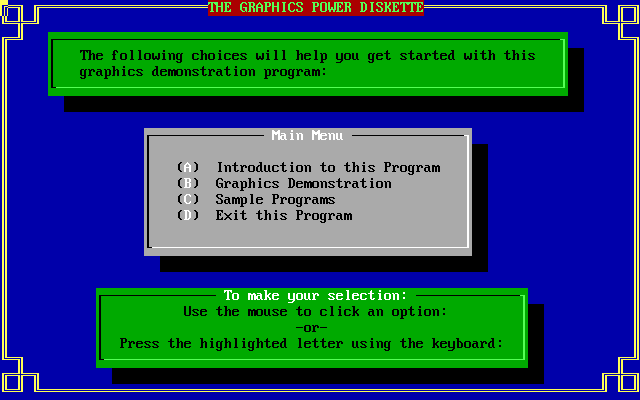
So, the image below is from our Graphics Power Diskette demonstration program from the old days. Also, the frame in the design is all ASCII, character codes 200 to 206.