Overview
This quick tip shows you how to display random images in PHP code. For example, you may want the user to see something different on refresh. Or, when they come back to the page.
Keep in mind, this method does not guarantee a different image will appear randomly. Sometimes, you may see the same image. Therefore, if you decide to use random images, you should use a minimum of three. We suggest five.
So, we use this method on the Techronology site. Simply, visit our homepage and press function key F5 to refresh page. The images under “Professional tools…” should change. Of course, one or two may not change, which okay.
Steps to display random images in PHP code
Step 1: Prepare the images
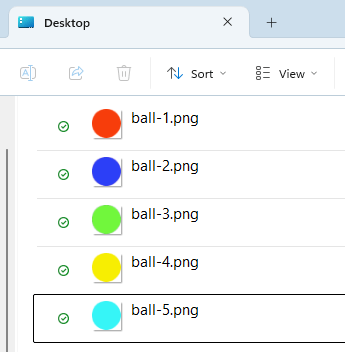
In our example, we have five balls. Additionally, they are indexed 1 to 5, which will make it easier for us to randomize.
Step 2: Create PHP code
<!DOCTYPE html>
<html lang="en">
<head>
    <meta charset="UTF-8" />
    <meta name="viewport" content="width=device-width, initial-scale=1.0" />
</head>
<body>
    <img src="images/balls/ball-<?php echo rand(1,5); ?>.png" alt="Random ball" />
</body>
</html>So, the above code is mostly HTML. However, take a look at line 8. That is where PHP comes in. We simply put in…
<?php echo rand(1,5); ?>
…as the random index number. Notice that you still need to put in the file extension. In this case, “.png”. Overall, this method makes it much easier to display a randomized image.
But, what if you have images with different names? Well, you can accomplish the same result in multiple ways, but we will show you with arrays.
Using arrays
<?php
    $ball[1] = 'blue-ball.png';
    $ball[2] = 'red-ball.png';
    $ball[3] = 'green-ball.png';
    $ball[4] = 'yellow-ball.png';
    $ball[5] = 'cyan-ball.png';
?>
<!DOCTYPE html>
<html lang="en">
<head>
    <meta charset="UTF-8" />
    <meta name="viewport" content="width=device-width, initial-scale=1.0" />
</head>
<body>
    <img src="images/balls/<?php echo $ball[rand(1,5)]; ?>" alt="Random ball" />
</body>
</html>In lines 1 to 7, we have images with different names. Line 15 displays the image using the following PHP code…
<?php echo $ball[rand(1,5)]; ?>